
 Other
OtherClaude and ChatGPT Adoption: Breadth of Use Beats Headcount
AI adoption is not just about how many employees use Claude or ChatGPT, but how broadly they apply them across tasks and workflows. While writing, search, and email are common starting points, specialized uses such as analysis, coding, and automation remain less common. The focus should be on expanding task breadth through role-specific enablement, clear usage guidance, and better adoption metrics.
Key takeaways
- AI adoption is not just about how many employees use Claude or ChatGPT, but how broadly they apply them across tasks and workflows.
- While writing, search, and email are common starting points, specialized uses such as analysis, coding, and automation remain less common.
- The focus should be on expanding task breadth through role-specific enablement, clear usage guidance, and better adoption metrics.
Written by the team at

DataCouch
Sahibzada Ajit Singh Nagar, India
About DataCouchDataCouch is a trusted enablement partner for leading technology providers including Confluent, Neo4j, Snowflake, Starburst, and Cloudera. Recognized as Confluent’s Global Education Partner of the Year for three consecutive years (2022–2024), we specialize in high-impact enablement pr
View provider profile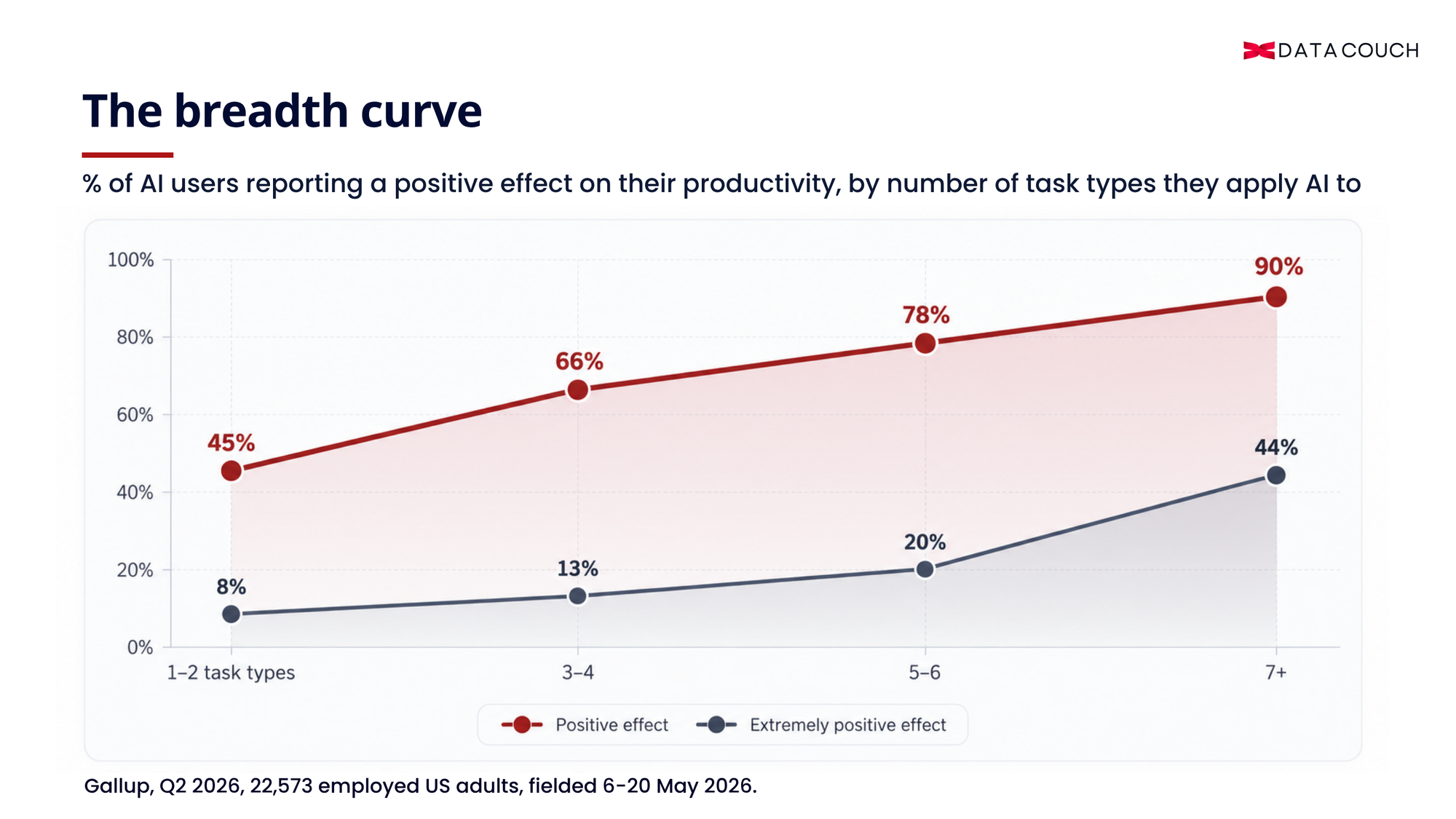
Figure 1: Reported productivity increases with breadth of AI use, from 45% of employees using AI for one or two task types to 90% of those using it for seven or more.
TL;DR AI adoption is not just about how many employees use Claude or ChatGPT, but how broadly they apply them across tasks and workflows. While writing, search, and email are common starting points, specialized uses such as analysis, coding, and automation remain less common. The focus should be on expanding task breadth through role-specific enablement, clear usage guidance, and better adoption metrics. |
Among US employees who apply AI to one or two kinds of tasks, 45% report a positive effect on their productivity. Among those applying it to seven or more, 90% do. The share reporting an extremely positive effect goes from 8% to 44% across the same range. Breadth of use, in other words, is what separates Claude and ChatGPT adoption that pays from adoption that does not.
Those figures come from Gallup’s Q2 2026 workforce study: 22,573 employed US adults surveyed 6–20 May 2026, ±0.9 percentage points. For teams that already have AI licences, the finding is particularly useful because it suggests that adoption should not be measured only by how many people are logged in. Reported productivity benefits are also associated with how broadly employees apply AI across their work.
Standard adoption dashboards are close to useless against that finding. Seats assigned, monthly actives, percentage of the team onboarded: none of those distinguishes a hundred people using Claude to tidy up emails from twenty people using it across seven parts of their week. A dashboard can show you that both groups are using AI. It cannot tell you whether one group has expanded AI into seven parts of the job while the other is still using it just for polishing emails.
The most common uses are the lowest-return ones
Gallup asked AI users what they actually use it for, and separately asked how it affected their productivity. Put the two lists side by side and a clear pattern emerges.
What AI is used for | Share of AI users doing it | Share reporting a positive productivity effect |
|---|---|---|
Writing and editing | 51% | 68% |
Search or research | 49% | 65% |
General assistance or problem-solving | 39% | 70% |
Knowledge or information management | 31% | 72% |
Email or communication management | 29% | 72% |
Meeting assistance or transcription | 19% | 73% |
Data science or analytics | 18% | 75% |
Presentation or slide deck creation | 17% | 76% |
Coding assistance | 16% | 77% |
Automation or process automation | 16% | 77% |
Source: Gallup, Q2 2026, 22,573 employed US adults. The productivity column combines extremely and somewhat positive responses.
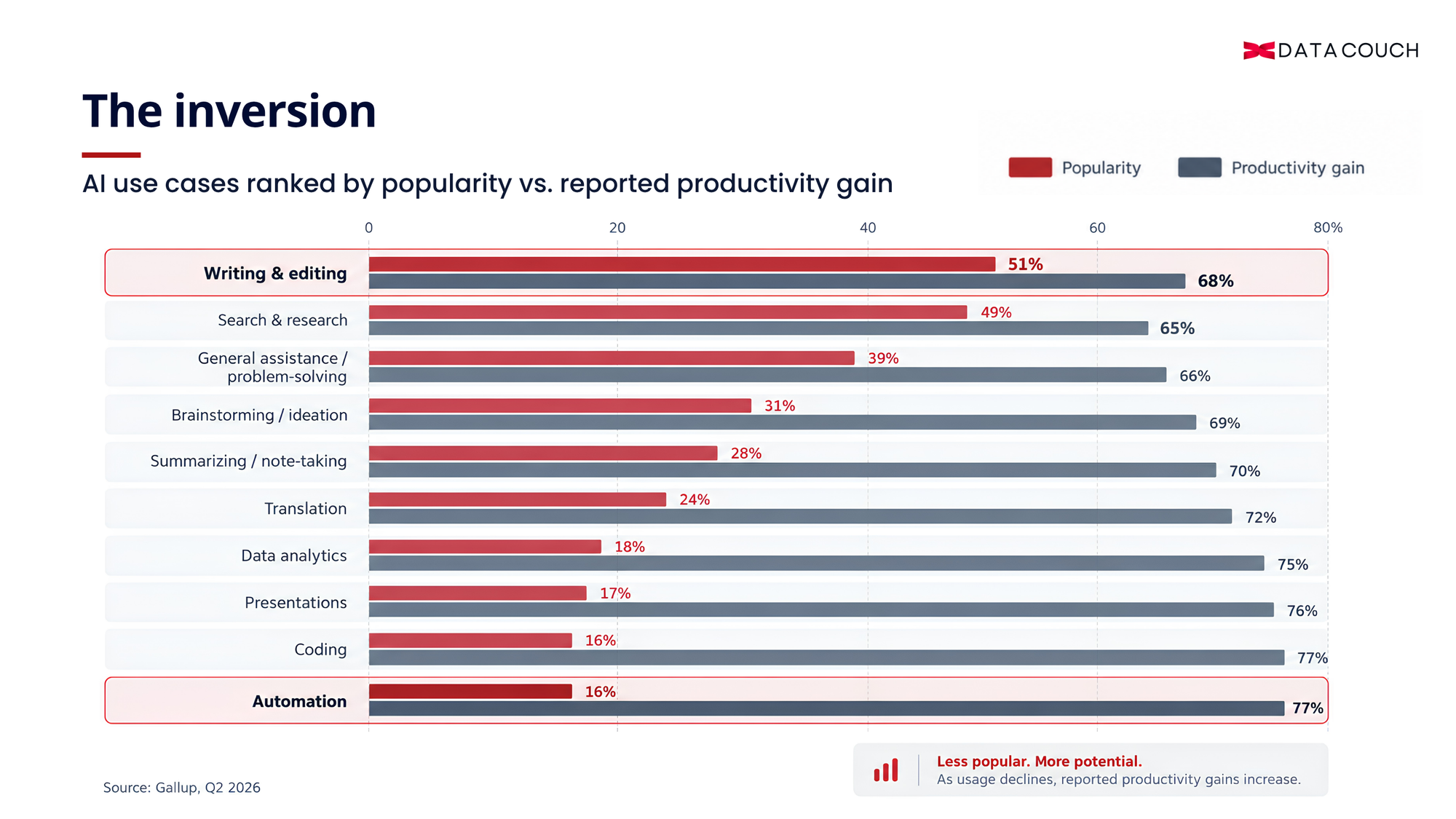
Figure 2: Ten AI use cases ranked by prevalence alongside the share of users reporting a positive productivity effect, showing that several less common use cases are associated with higher reported benefits.
Those two orderings are almost perfectly inverted. The two most common uses sit at the bottom of the productivity table, and the two highest-rated uses are joint tenth in popularity. Writing and editing is what half of AI users do, and ranks second-weakest in the entire list.
None of this argues against writing assistance. It argues about where a team stops. Many employees use Claude or ChatGPT first for drafting tasks. The challenge is ensuring that adoption does not stop there. Gallup’s earlier work on what separates adopters from holdouts found the same shape from the other direction: having the tool available predicts very little on its own. Claude or ChatGPT can quickly become a better drafting assistant. The problem is what happens next: the employee never gets shown where else it fits into the job.
A second, independent survey finds the same shape. CNBC and SurveyMonkey’s Q3 2026 AI and Jobs study, published 19 August 2026, split AI users by how often they use it and asked what for. Daily users and weekly users are close on the entry-level task, researching and gathering information, at 64% against 57%. Everything else shows a chasm: creating documents and reports 47% against 26%, analyzing data 44% against 25%, summarizing long documents 41% against 24%, planning and scheduling work 37% against 21%. Different panel, different question wording, same finding. The adept AI users are applying the technology across a wider range of work, including for automation, and not simply repeating the same task more often.
One caution from Gallup applies here, and is worth repeating rather than burying: this relationship does not prove that adding task types causes productivity gains. People who get more value from AI are probably more inclined to find new uses for it, and some jobs simply offer more surface area than others. Causality runs in a loop here. But the loop is still the thing to push on, because the entry point to it — which tasks a person tries — is the part a manager can change this month.
Why Claude and ChatGPT adoption stalls at two task types
Two recurring barriers can prevent employees from widening their use, and neither is simply a lack of AI skills. DataCouch works as a partner with both Anthropic and OpenAI, and the pattern on either tool is the same one. Without that mapping, employees have to identify relevant use cases for themselves, often in the gaps of an already full workload. An unsuccessful early experiment can then discourage them from exploring where else the tool might fit.
First, nobody has mapped the tool to their actual job. Generic prompting courses teach what the tool can do in the abstract. No such course tells a recruiter that screening a stack of applications against a scorecard is a task type, or tells an operations manager that turning last month’s incident log into a pattern is another one. Without that mapping, the employee has to derive their own use cases from first principles, in the gaps of a full workload. Most people run that experiment once, get a mediocre result on an unrepresentative task, and decide the tool is not useful for much else..
That is why adoption programmes need to be built around the employee’s actual work and not just around the features of the tool. DataCouch’s ChatGPT adoption training takes that role-based approach, helping teams connect ChatGPT with the tasks, workflows and decisions they already handle.
Second, permission. An employee who is unsure whether they can paste a supplier contract, a customer list or unreleased financials into a model will not paste any of them, and will quietly confine themselves to tasks involving no real data. Hence exactly the pattern the table above shows: generic drafting is easy to try, while analytics often requires access to real business data and clearer rules about what can be shared. Such caution is usually well founded.
In the same CNBC and SurveyMonkey study, 55% of workers said their employer has no official AI usage policy at all, and another 34% said use is simply optional. Training alone does not answer that question. Employees need practical, function-specific guidance on what data they can use, what they cannot use, and when human review is required. Enterprise governance may already cover those controls; the adoption gap is often translating them into decisions a marketing manager, analyst or sales lead can make during the workday.
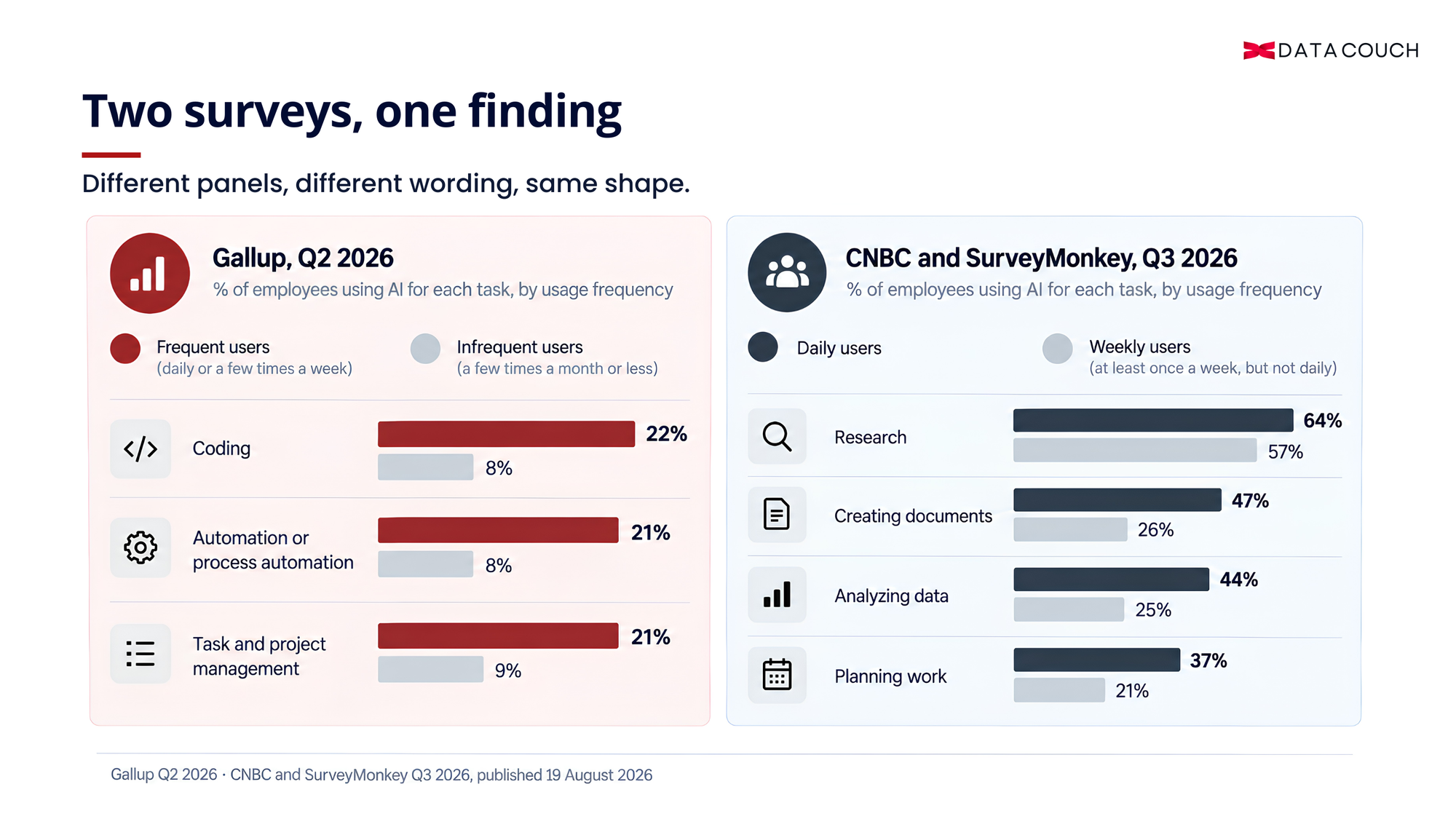
Figure 3: Two independent surveys showing heavy AI users pulling far ahead of infrequent users on analysis and automation tasks, but only slightly ahead on research.
Splitting responses from frequent and infrequent AI users, in the Gallup data, also supports this reading. Gaps between the two groups are widest precisely on the specialized applications: coding assistance 22% against 8%, automation 21% against 8%, task and project management 21% against 9%. Frequent users are not simply doing the same things more often. They are using AI for a wider range of tasks.
What the map looks like across five functions
Mapping is a plain exercise: list the recurring work, then mark which parts of it anyone has actually tried the tool on. Below is what that produces across five common functions. The middle column represents common starting points. The right column illustrates additional applications teams can explore, including categories associated in Gallup’s survey with higher reported productivity benefits.
AI adoption has a writing bias
Most teams begin with familiar applications: drafting emails, creating campaign copy or summarising reports. Yet some of AI's other opportunities lie in analysing information, identifying patterns and automating repetitive workflows.
The difference becomes clearer when we look at specific tasks employees could take on next.
From familiar uses to higher-value applications
Function | Beyond writing: The next opportunity |
Sales | Identify win/loss patterns; generate account-specific call briefs. |
Marketing | Extract insights from customer interviews; automate channel reports. |
Finance | Compare supplier contracts; extract data for ad hoc analysis. |
HR | Identify themes in employee surveys; automate interview scheduling. |
Support | Identify recurring ticket issues; build reusable response libraries. |
Key takeaway: AI maturity is not about using AI for more writing. It is about recognising where AI can help people make sense of information, improve decisions and execute work more effectively.
Look down the middle column and one thing is true of every row: it is writing. Look down the right column and the tasks are analysis, comparison, synthesis and automation. Those are among the categories with the highest shares of users reporting positive productivity effects and lowest for popularity, which is the whole argument of this piece expressed as a table.
Take one of those right-column items and see how ordinary it is. A support lead exports three months of tickets, pastes in a few hundred subject lines and resolution notes, and asks for the recurring themes with counts. Twenty minutes of work, no technical skill, and the output is a list the team can argue with. Nobody on that team would have described it as an AI task, because it does not involve writing anything. Which is precisely why it was never tried.
Two things about the order of these lists matter more than their contents.
Start where the output is verifiable. Finance commentary works as a first task because the analyst can see within thirty seconds whether the draft is wrong against numbers they already know. Give someone a first task whose output nobody can verify quickly and they learn nothing about when to trust the tool, and trust calibration is what carries them to the next level.
Assign the specialized tasks deliberately, because nobody finds them by drifting. Analysis and automation sit at the bottom of the popularity table for a reason: they do not look like AI tasks to a non-technical professional, and they usually need real data the employee is not sure they may use. Those two obstacles compound, which may help explain why some of the categories associated with higher reported productivity benefits are less commonly used.
Mapping is also the point at which a team stops guessing about which model suits which kind of work. Once the task list exists, that question has a concrete answer per row instead of a general one.
What to measure instead of licence utilization
Utilization tells you the licence is not wasted. Across the US workforce, 52% of employees now use AI in their role and 30% use it frequently, so a high seat-utilization number is an increasingly unremarkable one. Whether the team is getting the return is a different question, and the two are easy to confuse on a dashboard.
Task types covered per person, counted quarterly. Ask each person to name the distinct kinds of work they used AI for in the last month. One number between one and twelve, per head. Distribution matters more than the mean here, because it shows you who to pair with whom.
The specialized-to-general ratio. How much of the team’s use falls in analytics, automation, coding assistance and project management, against drafting and search. Gallup’s data suggests that this mix of specialized and general use is worth tracking alongside overall usage.
Time from first use to third task type. Your proxy for whether the mapping work happened. If people are still on one task type after ninety days, it may indicate that enablement has not yet translated into broader application, regardless of the completion rate.
Unanswered permission questions. Count the times someone asked whether they could put something into the tool and got no clear answer, or did not ask and avoided the task. This can be one of the more practical barriers to identify and address, while remaining easy to miss in standard adoption reporting.
Report these alongside seat utilization rather than instead of it. A function head who can say “my team averaged 2.1 task types in Q1 and 5.4 in Q3” is describing something that happened. Reporting near-full seat utilization describes a purchase.
Start with your own week
Take your own calendar for the past fortnight and write down every recurring task in it. Then mark which ones you have tried with Claude or ChatGPT, which you have not tried because you were not sure it would work, and which you have not tried because you were not sure you were allowed to. Column three is usually the longest. These are not necessarily tasks employees cannot do with AI; they are tasks where nobody has given them a clear answer yet.
Run the same exercise with the team afterwards, in a room, out loud. People discover use cases from each other faster than from any curriculum, and forty minutes of that produces a list better fitted to your function than anything a vendor writes for you.
DataCouch builds role-based enablement around this kind of task mapping rather than generic prompting classes. For help mapping the task types for one function, that is where to start.
CTA Block
Heading: Move from AI access to broader adoption Subheading: DataCouch helps leaders and business teams identify where AI fits into their actual work, build practical usage habits, and expand beyond basic tasks. |
Gallup figures are from its Q2 2026 US workforce study, fielded 6–20 May 2026. CNBC and SurveyMonkey figures are from their Q3 2026 AI and Jobs survey, published 19 August 2026. Both describe US workers, and both report self-assessed effects rather than measured output.
Ready to grow your training business?
List your courses on our marketplace and reach corporate buyers.


